by Joche Ojeda | Dec 23, 2025 | ADO, ADO.NET, XPO
One of the recurring challenges in real-world systems is not building new software — it’s
integrating with software that already exists.
Legacy systems don’t disappear just because newer technologies are available. They survive because they work,
because they hold critical business data, and because replacing them is often risky, expensive, or simply not allowed.
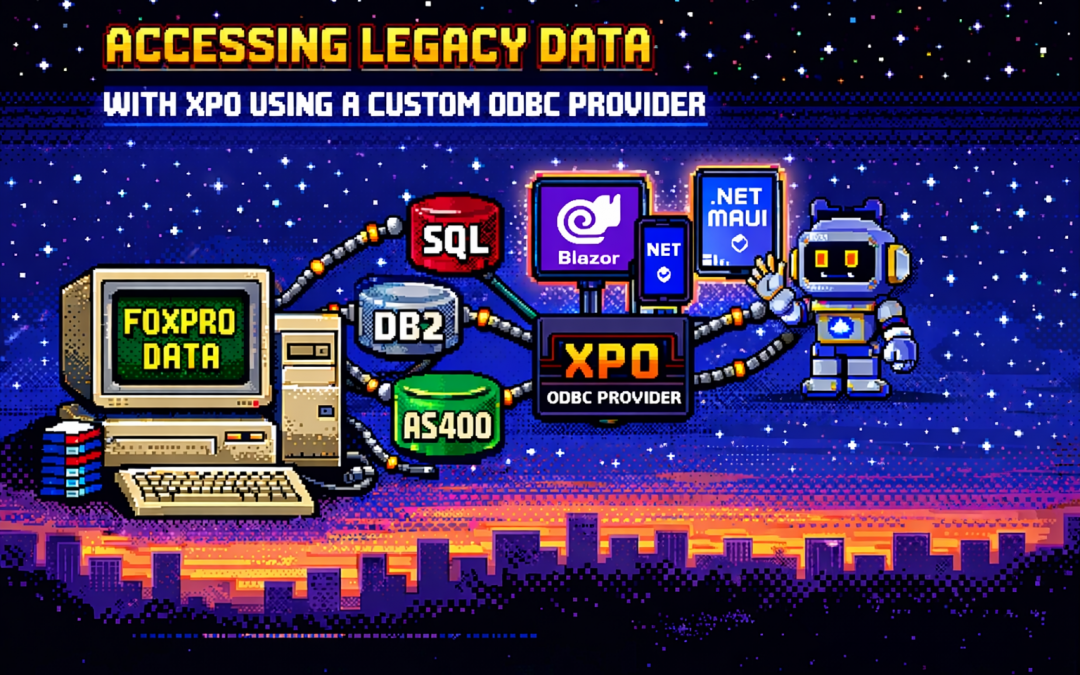
This article explores a practical approach to accessing legacy data using XPO by leveraging ODBC,
not as a universal abstraction, but as a bridge when no modern provider exists.
The Reality of Legacy Systems
Many organizations still rely on systems built on technologies such as:
- FoxPro tables
- AS400 platforms
- DB2-based systems
- Proprietary or vendor-abandoned databases
In these scenarios, it’s common to find that:
- There is no modern .NET provider
- There is no ORM support
- There is an ODBC driver
That last point is crucial. ODBC often remains available long after official SDKs and providers have disappeared.
It becomes the last viable access path to critical data.
Why ORMs Struggle with Legacy Data
Modern ORMs assume a relatively friendly environment: a supported database engine, a known SQL dialect,
a compatible type system, and an actively maintained provider.
Legacy databases rarely meet those assumptions. As a result, teams are often forced to:
- Drop down to raw SQL
- Build ad-hoc data access layers
- Treat legacy data as a second-class citizen
This becomes especially painful in systems that already rely heavily on DevExpress XPO for persistence,
transactions, and domain modeling.
ODBC Is Not Magic — and That’s the Point
ODBC is often misunderstood.
Using ODBC does not mean:
- One provider works for every database
- SQL becomes standardized
- Type systems become compatible
Each ODBC-accessible database still has:
- Its own SQL dialect
- Its own limitations
- Its own data types
- Its own behavioral quirks
ODBC simply gives you a way in. It is a transport mechanism, not a universal language.
What an XPO ODBC Provider Really Is
When you implement an XPO provider on top of ODBC, you are not building a generic solution for all databases.
You are building a targeted adapter for a specific legacy system that happens to be reachable via ODBC.
This matters because ODBC is used here as a pragmatic trick:
- To connect to something you otherwise couldn’t
- To reuse an existing, stable access path
- To avoid rewriting or destabilizing legacy systems
The database still dictates the SQL dialect, supported features, and type system. Your provider must respect those constraints.
Why XPO Makes This Possible
XPO is not just an ORM — it is a provider-based persistence framework.
All SQL-capable XPO providers are built on top of a shared foundation, most notably:
ConnectionProviderSql
https://docs.devexpress.com/CoreLibraries/DevExpress.Xpo.DB.ConnectionProviderSql
This architecture allows you to reuse XPO’s core benefits:
- Object model
- Sessions and units of work
- Transaction handling
- Integration with domain logic
While customizing what legacy systems require:
- SQL generation
- Command execution
- Schema discovery
- Type mapping
Dialects and Type Systems Still Matter
Even when accessed through ODBC:
- FoxPro is not SQL Server
- DB2 is not PostgreSQL
- AS400 is not Oracle
Each system has its own:
- Date and time semantics
- Numeric precision rules
- String handling behavior
- Constraints and limits
An XPO ODBC provider must explicitly map database types, handle dialect-specific SQL,
and avoid assumptions about “standard SQL.” ODBC opens the door — it does not normalize what’s inside.
Real-World Experience: AS400 and DB2 in Production
This approach is not theoretical. Last year, we implemented a custom XPO provider using ODBC for
AS400 and DB2 systems in Mexico, where:
- No viable modern .NET provider existed
- The systems were deeply embedded in business operations
- ODBC was the only stable integration path
By introducing an XPO provider on top of ODBC, we were able to integrate legacy data into a modern .NET architecture,
preserve domain models and transactional behavior, and avoid rewriting or destabilizing existing systems.
The Hidden Advantage: Modern UI and AI Access
Once legacy data is exposed through XPO, something powerful happens: that data becomes immediately available to modern platforms.
- Blazor applications
- .NET MAUI mobile and desktop apps
- Background services
- Integration APIs
- AI agents and assistants
And you get this without rewriting the database, migrating the data, or changing the legacy system.
XPO becomes the adapter that allows decades-old data to participate in modern UI stacks, automated workflows,
and AI-driven experiences.
Why Not Just Use Raw ODBC?
Raw ODBC gives you rows, columns, and primitive values. XPO gives you domain objects, identity tracking,
relationships, transactions, and a consistent persistence model.
The goal is not to modernize the database. The goal is to modernize access to legacy data
so it can safely participate in modern architectures.
Closing Thought
An XPO ODBC provider is not a silver bullet. It will not magically unify SQL dialects, type systems, or database behavior.
But when used intentionally, it becomes a powerful bridge between systems that cannot be changed
and architectures that still need to evolve.
ODBC is the trick that lets you connect.
XPO is what makes that connection usable — everywhere, from Blazor UIs to AI agents.

by Joche Ojeda | Jan 22, 2025 | ADO, ADO.NET, C#, Data Synchronization, EfCore, XPO, XPO Database Replication
Working with the SyncFramework, I’ve noticed a recurring pattern when discussing schema design with customers. One crucial question that often surprises them is about their choice of primary keys: “Are you using auto-incremental integers or unique identifiers (like GUIDs)?”
Approximately 90% of users rely on auto-incremental integer primary keys. While this seems like a straightforward choice, it can create significant challenges for data synchronization. Let’s dive deep into how different database engines handle auto-increment values and why this matters for synchronization scenarios.
Database Implementation Deep Dive
SQL Server
SQL Server uses the IDENTITY property, storing current values in system tables (sys.identity_columns) and caching them in memory for performance. During restarts, it reads the last used value from these system tables. The values are managed as 8-byte numbers internally, with new ranges allocated when the cache is exhausted.
MySQL
MySQL’s InnoDB engine maintains auto-increment counters in memory and persists them to the system tablespace or table’s .frm file. After a restart, it scans the table to find the maximum used value. Each table has its own counter stored in the metadata.
PostgreSQL
PostgreSQL takes a different approach, using separate sequence objects stored in the pg_class catalog. These sequences maintain their own relation files containing crucial metadata like last value, increment, and min/max values. The sequence data is periodically checkpointed to disk for durability.
Oracle
Oracle traditionally uses sequences and triggers, with modern versions (12c+) supporting identity columns. The sequence information is stored in the SEQ$ system table, tracking the last number used, cache size, and increment values.
The Synchronization Challenge
This diversity in implementation creates several challenges for data synchronization:
- Unpredictable Sequence Generation: Even within the same database engine, gaps can occur due to rolled-back transactions or server restarts.
- Infrastructure Dependencies: The mechanisms for generating next values are deeply embedded within each database engine and aren’t easily accessible to frameworks like Entity Framework or XPO.
- Cross-Database Complexity: When synchronizing across different database instances, coordinating auto-increment values becomes even more complex.
The GUID Alternative
Using GUIDs (Globally Unique Identifiers) as primary keys offers a solution to these synchronization challenges. While GUIDs come with their own set of considerations, they provide guaranteed uniqueness across distributed systems without requiring centralized coordination.
Traditional GUID Concerns
- Index fragmentation
- Storage size
- Performance impact
Modern Solutions
These concerns have been addressed through:
- Sequential GUID generation techniques
- Improved indexing in modern databases
- Optimizations in .NET 9
Recommendations
When designing systems that require data synchronization:
- Consider using GUIDs instead of auto-increment integers for primary keys
- Evaluate sequential GUID generation for better performance
- Understand that auto-increment values, while simple, can complicate synchronization scenarios
- Plan for the infrastructure needed to maintain consistent primary key generation across your distributed system
Conclusion
The choice of primary key strategy significantly impacts your system’s ability to handle data synchronization effectively. While auto-increment integers might seem simpler at first, understanding their implementation details across different databases reveals why GUIDs often provide a more robust solution for distributed systems.
Remember: Data synchronization is not a trivial problem, and your primary key strategy plays a crucial role in its success. Take the time to evaluate your requirements and choose the appropriate approach for your specific use case.
Till next time, happy delta encoding.

by Joche Ojeda | Jan 22, 2025 | ADO.NET, C#, Data Synchronization, Database, DevExpress, XPO, XPO Database Replication
SyncFramework for XPO is a specialized implementation of our delta encoding synchronization library, designed specifically for DevExpress XPO users. It enables efficient data synchronization by tracking and transmitting only the changes between data versions, optimizing both bandwidth usage and processing time.
What’s New
- Base target framework updated to .NET 8.0
- Added compatibility with .NET 9.0
- Updated DevExpress XPO dependencies to 24.2.3
- Continued support for delta encoding synchronization
- Various performance improvements and bug fixes
Framework Compatibility
- Primary Target: .NET 8.0
- Additional Support: .NET 9.0
Our XPO implementation continues to serve the DevExpress community.
Key Features
- Seamless integration with DevExpress XPO
- Efficient delta-based synchronization
- Support for multiple database providers
- Cross-platform compatibility
- Easy integration with existing XPO and XAF applications
As always, if you own a license, you can compile the source code yourself from our GitHub repository. The framework maintains its commitment to providing reliable data synchronization for XPO applications.
Happy Delta Encoding! ?

by Joche Ojeda | Jan 12, 2025 | ADO.NET, C#, CPU, dotnet, ORM, XAF, XPO
Introduction
In the .NET ecosystem, “AnyCPU” is often considered a silver bullet for cross-platform deployment. However, this assumption can lead to significant problems when your application depends on native assemblies. In this post, I want to share a personal story that highlights how I discovered these limitations and how native dependencies affect the true portability of AnyCPU applications, especially for database access through ADO.NET and popular ORMs.
My Journey to Understanding AnyCPU’s Limitations
Every year, around Thanksgiving or Christmas, I visit my friend, brother, and business partner Javier. Two years ago, during one of these visits, I made a decision that would lead me to a pivotal realization about AnyCPU architecture.
At the time, I was tired of traveling with my bulky MSI GE72 Apache Pro-24 gaming laptop. According to MSI’s official specifications, it weighed 5.95 pounds—but that number didn’t include the hefty charger, which brought the total to around 12 pounds. Later, I upgraded to an MSI GF63 Thin, which was lighter at 4.10 pounds—but with the charger, it was still around 7.5 pounds. Lugging these laptops through airports felt like a workout.
Determined to travel lighter, I purchased a MacBook Air with the M2 chip. At just 2.7 pounds, including the charger, the MacBook Air felt like a breath of fresh air. The Apple Silicon chip was incredibly fast, and I immediately fell in love with the machine.
Having used a MacBook Pro with Bootcamp and Windows 7 years ago, I thought I could recreate that experience by running a Windows virtual machine on my MacBook Air to check projects and do some light development while traveling.
The Virtualization Experiment
As someone who loves virtualization, I eagerly set up a Windows virtual machine on my MacBook Air. I grabbed my trusty Windows x64 ISO, set up the virtual machine, and attempted to boot it—but it failed. I quickly realized the issue was related to CPU architecture. My x64 ISO wasn’t compatible with the ARM-based M2 chip.
Undeterred, I downloaded a Windows 11 ISO for ARM architecture and created the VM. Success! Windows was up and running, and I installed Visual Studio along with my essential development tools, including DevExpress XPO (my favorite ORM).
The Demo Disaster
The real test came during a trip to Dubai, where I was scheduled to give a live demo showcasing how quickly you can develop Line-of-Business (LOB) apps with XAF. Everything started smoothly until I tried to connect my XAF app to the database. Despite my best efforts, the connection failed.
In the middle of the demo, I switched to an in-memory data provider to salvage the presentation. After the demo, I dug into the issue and realized the root cause was related to the CPU architecture. The native database drivers I was using weren’t compatible with the ARM architecture.
A Familiar Problem
This situation reminded me of the transition from x86 to x64 years ago. Back then, I encountered similar issues where native drivers wouldn’t load unless they matched the process architecture.
The Native Dependency Challenge
Platform-Specific Loading Requirements
Native DLLs must exactly match the CPU architecture of your application:
- If your app runs as x86, it can only load x86 native DLLs.
- If running as x64, it requires x64 native DLLs.
- ARM requires ARM-specific binaries.
- ARM64 requires ARM64-specific binaries.
There is no flexibility—attempting to load a DLL compiled for a different architecture results in an immediate failure.
How Native Libraries are Loaded
When your application loads a native DLL, the operating system follows a specific search pattern:
- The application’s directory
- System directories (System32/SysWOW64)
- Directories listed in the PATH environment variable
Crucially, these native libraries must match the exact architecture of the running process.
// This seemingly simple code
[DllImport("native.dll")]
static extern void NativeMethod();

// Actually requires:
// - native.dll compiled for x86 when running as 32-bit
// - native.dll compiled for x64 when running as 64-bit
// - native.dll compiled for ARM64 when running on ARM64
The SQL Server Example
Let’s look at SQL Server connectivity, a common scenario where the AnyCPU illusion breaks down:
// Traditional ADO.NET connection
using (var connection = new SqlConnection(connectionString))
{
    // This requires SQL Native Client
    // Which must match the process architecture
    await connection.OpenAsync();
}
Even though your application is compiled as AnyCPU, the SQL Native Client must match the process architecture. This becomes particularly problematic on newer architectures like ARM64, where native drivers may not be available.
Impact on ORMs
Entity Framework Core
Entity Framework Core, despite its modern design, still relies on database providers that may have native dependencies:
public class MyDbContext : DbContext
{
    protected override void OnConfiguring(DbContextOptionsBuilder optionsBuilder)
    {
        // This configuration depends on:
        // 1. SQL Native Client
        // 2. Microsoft.Data.SqlClient native components
        optionsBuilder.UseSqlServer(connectionString);
    }
}
DevExpress XPO
DevExpress XPO faces similar challenges:
// XPO configuration
string connectionString = MSSqlConnectionProvider.GetConnectionString("server", "database");
XpoDefault.DataLayer = XpoDefault.GetDataLayer(connectionString, AutoCreateOption.DatabaseAndSchema);

// The MSSqlConnectionProvider relies on the same native SQL Server components
Solutions and Best Practices
1. Architecture-Specific Deployment
Instead of relying on AnyCPU, consider creating architecture-specific builds:
<PropertyGroup>
    <Platforms>x86;x64;arm64</Platforms>
    <RuntimeIdentifiers>win-x86;win-x64;win-arm64</RuntimeIdentifiers>
</PropertyGroup>
2. Runtime Provider Selection
Implement smart provider selection based on the current architecture:
public static class DatabaseProviderFactory
{
    public static IDbConnection GetProvider()
    {
        return RuntimeInformation.ProcessArchitecture switch
        {
            Architecture.X86 => new SqlConnection(), // x86 native provider
            Architecture.X64 => new SqlConnection(), // x64 native provider
            Architecture.Arm64 => new Microsoft.Data.SqlClient.SqlConnection(), // ARM64 support
            _ => throw new PlatformNotSupportedException()
        };
    }
}
3. Managed Fallbacks
Implement fallback strategies when native providers aren’t available:
public class DatabaseConnection
{
    public async Task<IDbConnection> CreateConnectionAsync()
    {
        try
        {
            var connection = new SqlConnection(_connectionString);
            await connection.OpenAsync();
            return connection;
        }
        catch (DllNotFoundException)
        {
            var managedConnection = new Microsoft.Data.SqlClient.SqlConnection(_connectionString);
            await managedConnection.OpenAsync();
            return managedConnection;
        }
    }
}
4. Deployment Considerations
- Include all necessary native dependencies for each target architecture.
- Use architecture-specific directories in your deployment.
- Consider self-contained deployment to include the correct runtime.
Real-World Implications
This experience taught me that while AnyCPU provides excellent flexibility for managed code, it has limitations when dealing with native dependencies. These limitations become more apparent in scenarios like cloud deployments, ARM64 devices, and live demos.
Conclusion
The transition to ARM architecture is accelerating, and understanding the nuances of AnyCPU and native dependencies is more important than ever. By planning for architecture-specific deployments and implementing fallback strategies, you can build more resilient applications that can thrive in a multi-architecture world.

by Joche Ojeda | Oct 15, 2024 | A.I, Semantic Kernel, XAF, XPO
A few weeks ago, I forked the Semantic Kernel repository to experiment with it. One of my first experiments was to create a memory provider for XPO. The task was not too difficult; basically, I needed to implement the IMemoryStore interface, add some XPO boilerplate code, and just like that, we extended the Semantic Kernel memory store to support 10+ databases. You can check out the code for the XpoMemoryStore here.
My initial goal in creating the XpoMemoryStore was simply to see if XPO would be a good fit for handling embeddings. Spoiler alert: it was! To understand the basic functionality of the plugin, you can take a look at the integration test here.
As you can see, usage is straightforward. You start by connecting to the database that handles embedding collections, and all you need is a valid XPO connection string:
using XpoMemoryStore db = await XpoMemoryStore.ConnectAsync("XPO connection string");
In my original design, everything worked fine, but I faced some challenges when trying to use my new XpoMemoryStore in XAF. Here’s what I encountered:
- The implementation of XpoMemoryStore uses its own data layer, which can lead to issues. This needs to be rewritten to use the same data layer as XAF.
- The XpoEntry implementation cannot be extended. In some use cases, you might want to use a different object to store the embeddings, perhaps one that has an association with another object.
To address these problems, I introduced the IXpoEntryManager interface. The goal of this interface is to handle object creation and queries.
public interface IXpoEntryManager
{
    T CreateObject();
    public event EventHandler ObjectCreatedEvent;
    void Commit();
    IQueryable GetQuery(bool inTransaction = true);
    void Delete(object instance);
    void Dispose();
}
Now, object creation is handled through the CreateObject<T> method, allowing the underlying implementation to be changed to use a UnitOfWork or ObjectSpace. There’s also the ObjectCreatedEvent event, which lets you access the newly created object in case you need to associate it with another object. Lastly, the GetQuery<T> method enables redirecting the search for records to a different type.
I’ll keep updating the code as needed. If you’d like to discuss AI, XAF, or .NET, feel free to schedule a meeting: Schedule a Meeting with us.
Until next time, XAF out!
Related Article
https://www.jocheojeda.com/2024/09/04/using-the-imemorystore-interface-and-devexpress-xpo-orm-to-implement-a-custom-memory-store-for-semantic-kernel/

by Joche Ojeda | Sep 4, 2024 | A.I, Semantic Kernel, XPO
In today’s AI-driven world, the ability to quickly and efficiently store, retrieve, and manage data is crucial for developing sophisticated applications. One tool that helps facilitate this is the Semantic Kernel, a lightweight, open-source development kit designed for integrating AI models into C#, Python, or Java applications. It enables rapid enterprise-grade solutions by serving as an effective middleware.
One of the key concepts in Semantic Kernel is memory—a collection of records, each containing a timestamp, metadata, embeddings, and a key. These memory records can be stored in various ways, depending on how you implement the interfaces. This flexibility allows you to define the storage mechanism, which means you can choose any database solution that suits your needs.
In this blog post, we’ll walk through how to use the IMemoryStore interface in Semantic Kernel and implement a custom memory store using DevExpress XPO, an ORM (Object-Relational Mapping) tool that can interact with over 14 database engines with a single codebase.
Why Use DevExpress XPO ORM?
DevExpress XPO is a powerful, free-to-use ORM created by DevExpress that abstracts the complexities of database interactions. It supports a wide range of database engines such as SQL Server, MySQL, SQLite, Oracle, and many others, allowing you to write database-independent code. This is particularly helpful when dealing with a distributed or multi-environment system where different databases might be used.
By using XPO, we can seamlessly create, update, and manage memory records in various databases, making our application more flexible and scalable.
Implementing a Custom Memory Store with DevExpress XPO
To integrate XPO with Semantic Kernel’s memory management, we’ll implement a custom memory store by defining a database entry class and a database interaction class. Then, we’ll complete the process by implementing the IMemoryStore interface.
Step 1: Define a Database Entry Class
Our first step is to create a class that represents the memory record. In this case, we’ll define an XpoDatabaseEntry class that maps to a database table where memory records are stored.
public class XpoDatabaseEntry : XPLiteObject {
    private string _oid;
    private string _collection;
    private string _timestamp;
    private string _embeddingString;
    private string _metadataString;
    private string _key;

    [Key(false)]
    public string Oid { get; set; }
    public string Key { get; set; }
    public string MetadataString { get; set; }
    public string EmbeddingString { get; set; }
    public string Timestamp { get; set; }
    public string Collection { get; set; }

    protected override void OnSaving() {
        if (this.Session.IsNewObject(this)) {
            this.Oid = Guid.NewGuid().ToString();
        }
        base.OnSaving();
    }
}
This class extends XPLiteObject from the XPO library, which provides methods to manage the record lifecycle within the database.
Step 2: Create a Database Interaction Class
Next, we’ll define an XpoDatabase class to abstract the interaction with the data store. This class provides methods for creating tables, inserting, updating, and querying records.
internal sealed class XpoDatabase {
    public Task CreateTableAsync(IDataLayer conn) {
        using (Session session = new(conn)) {
            session.UpdateSchema(new[] { typeof(XpoDatabaseEntry).Assembly });
            session.CreateObjectTypeRecords(new[] { typeof(XpoDatabaseEntry).Assembly });
        }
        return Task.CompletedTask;
    }

    // Other database operations such as CreateCollectionAsync, InsertOrIgnoreAsync, etc.
}
This class acts as a bridge between Semantic Kernel and the database, allowing us to manage memory entries without having to write complex SQL queries.
Step 3: Implement the IMemoryStore Interface
Finally, we implement the IMemoryStore interface, which is responsible for defining how the memory store behaves. This includes methods like UpsertAsync, GetAsync, and DeleteCollectionAsync.
public class XpoMemoryStore : IMemoryStore, IDisposable {
    public static async Task ConnectAsync(string connectionString) {
        var memoryStore = new XpoMemoryStore(connectionString);
        await memoryStore._dbConnector.CreateTableAsync(memoryStore._dataLayer).ConfigureAwait(false);
        return memoryStore;
    }

    public async Task CreateCollectionAsync(string collectionName) {
        await this._dbConnector.CreateCollectionAsync(this._dataLayer, collectionName).ConfigureAwait(false);
    }

    // Other methods for interacting with memory records
}
The XpoMemoryStore class takes advantage of XPO’s ORM features, making it easy to create collections, store and retrieve memory records, and perform batch operations. Since Semantic Kernel doesn’t care where memory records are stored as long as the interfaces are correctly implemented, you can now store your memory records in any of the databases supported by XPO.
Advantages of Using XPO with Semantic Kernel
- Database Independence: You can switch between multiple databases without changing your codebase.
- Scalability: XPO’s ability to manage complex relationships and large datasets makes it ideal for enterprise-grade solutions.
- ORM Abstraction: With XPO, you avoid writing SQL queries and focus on high-level operations like creating and updating objects.
Conclusion
In this blog post, we’ve demonstrated how to integrate DevExpress XPO ORM with the Semantic Kernel using the IMemoryStore interface. This approach allows you to store AI-driven memory records in a wide variety of databases while maintaining a flexible, scalable architecture.
In future posts, we’ll explore specific use cases and how you can leverage this memory store in real-world applications. For the complete implementation, you can check out my GitHub fork.
Stay tuned for more insights and examples!
