
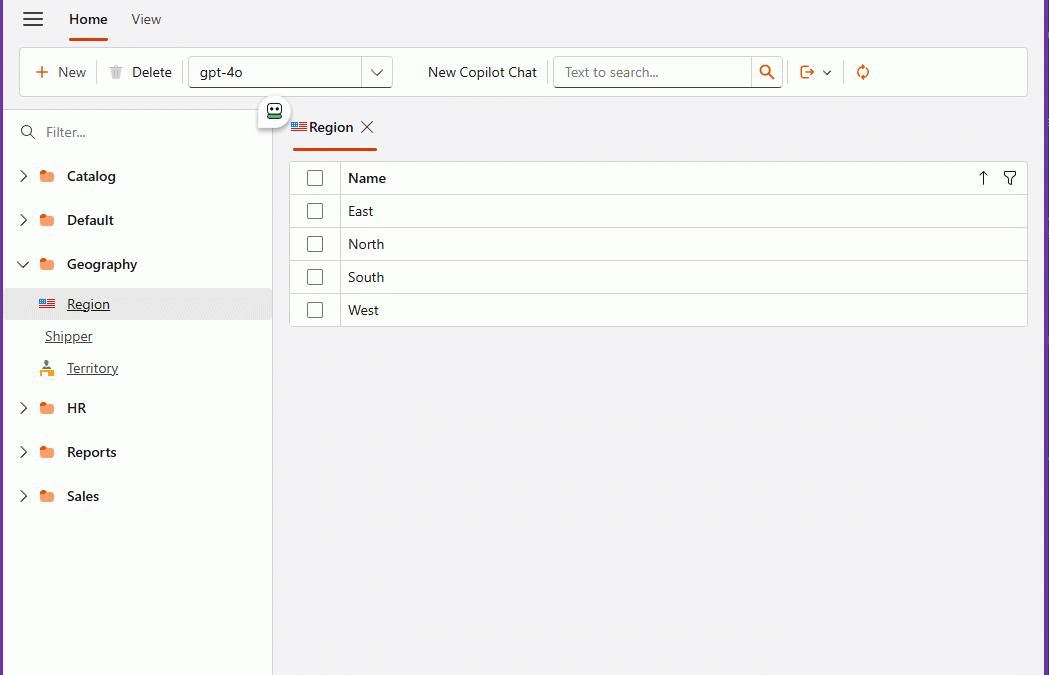
The Day I Integrated GitHub Copilot SDK Inside My XAF App (Part 1)
A strange week
This week I was going to the university every day to study Russian.
Learning a new language as an adult is a very humbling experience. One moment you are designing enterprise architectures, and the next moment you are struggling to say:
me siento bien
which in Russian is: я чувствую себя хорошо
So like any developer, I started cheating immediately.
I began using AI for everything:
- ChatGPT to review my exercises
- GitHub Copilot inside VS Code correcting my grammar
- Sometimes both at the same time
It worked surprisingly well. Almost too well.
At some point during the week, while going back and forth between my Russian homework and my development work, I noticed something interesting.
I was using several AI tools, but the one I kept returning to the most — without even thinking about it — was GitHub Copilot inside Visual Studio Code.
Not in the browser. Not in a separate chat window. Right there in my editor.
That’s when something clicked.
Two favorite tools
XAF is my favorite application framework. I’ve built countless systems with it — ERPs, internal tools, experiments, prototypes.
GitHub Copilot has become my favorite AI agent.
I use it constantly:
- writing code
- reviewing ideas
- fixing small mistakes
- even correcting my Russian exercises
And while using Copilot so much inside Visual Studio Code, I started thinking:
What would it feel like to have Copilot inside my own applications?
Not next to them. Inside them.
That idea stayed in my head for a few days until curiosity won.
The innocent experiment
I discovered the GitHub Copilot SDK.
At first glance it looked simple: a .NET library that allows you to embed Copilot into your own applications.
My first thought:
“Nice. This should take 30 minutes.”
Developers should always be suspicious of that sentence.
Because it never takes 30 minutes.
First success (false confidence)
The initial integration was surprisingly easy.
I managed to get a basic response from Copilot inside a test environment. Seeing AI respond from inside my own application felt a bit surreal.
For a moment I thought:
Done. Easy win.
Then I tried to make it actually useful.
That’s when the adventure began.
The rabbit hole
I didn’t want just a chatbot.
I wanted an agent that could actually interact with the application.
Ask questions. Query data. Help create things.
That meant enabling tool calling and proper session handling.
And suddenly everything started failing.
Timeouts. Half responses. Random behavior depending on the model. Sessions hanging for no clear reason.
At first I blamed myself.
Then my integration. Then threading. Then configuration.
Three or four hours later, after trying everything I could think of, I finally discovered the real issue:
It wasn’t my code.
It was the model.
Some models were timing out during tool calls. Others worked perfectly.
The moment I switched models and everything suddenly worked was one of those small but deeply satisfying developer victories.
You know the moment.
You sit back. Look at the screen. And just smile.
The moment it worked
Once everything was connected properly, something changed.
Copilot stopped feeling like a coding assistant and started feeling like an agent living inside the application.
Not in the IDE. Not in a browser tab. Inside the system itself.
That changes the perspective completely.
Instead of building forms and navigation flows, you start thinking:
What if the user could just ask?
Instead of:
- open this screen
- filter this grid
- generate this report
You imagine:
- “Show me what matters.”
- “Create what I need.”
- “Explain this data.”
The interface becomes conversational.
And once you see that working inside your own application, it’s very hard to unsee it.
Why this experiment mattered to me
This wasn’t about building a feature for a client. It wasn’t even about shipping production code.
Most of my work is research and development. Prototypes. Ideas. Experiments.
And this experiment changed the way I see enterprise applications.
For decades we optimized screens, menus, and workflows.
But AI introduces a completely different interaction model.
One where the application is no longer just something you navigate.
It’s something you talk to.
Also… Russian homework
Ironically, this whole experiment started because I was trying to survive my Russian classes.
Using Copilot to correct grammar. Using AI to review exercises. Switching constantly between tools.
Eventually that daily workflow made me curious:
What happens if Copilot is not next to my application, but inside it?
Sometimes innovation doesn’t start with a big strategy.
Sometimes it starts with curiosity and a small personal frustration.
What comes next
This is just the beginning.
Now that AI can live inside applications:
- conversations can become interfaces
- tools can be invoked by language
- workflows can become more flexible
We are moving from:
software you operate
to:
software you collaborate with
And honestly, that’s a very exciting direction.
Final thought
This entire journey started with a simple curiosity while studying Russian and writing code in the same week.
A few hours of experimentation later, Copilot was living inside my favorite framework.
And now I can’t imagine going back.
Note: The next article will go deep into the technical implementation — the architecture, the service layer, tool calling, and how I wired everything into XAF for both Blazor and WinForms.