
by Joche Ojeda | Feb 9, 2026 | A.I
Last week I was in Sochi on a ski trip. Instead of skiing, I got sick.
So I spent a few days locked in a hotel room, doing what I always do when I can’t move much: working. Or at least what looks like work. In reality, it’s my hobby.
YouTube wasn’t working well there, so I downloaded a few episodes in advance. Most of them were about OpenClaw and its creator, Peter Steinberger — also known for building PSPDFKit.
What started as passive watching turned into one of those rare moments of clarity you only get when you’re forced to slow down.
Shipping Code You Don’t Read (In the Right Context)
In one of the interviews, Peter said something that immediately caught my attention: he ships code he doesn’t review.
At first that sounds reckless. But then I realized… I sometimes do the same.
However, context matters.
Most of my daily work is research and development. I build experimental systems, prototypes, and proofs of concept — either for our internal office or for exploring ideas with clients. A lot of what I write is not production software yet. It’s exploratory. It’s about testing possibilities.
In that environment, I don’t always need to read every line of generated code.
If the use case works and the tests pass, that’s often enough.
I work mainly with C#, ASP.NET, Entity Framework, and XAF from DevExpress. I know these ecosystems extremely well. So if something breaks later, I can go in and fix it myself. But most of the time, the goal isn’t to perfect the implementation — it’s to validate the idea.
That’s a crucial distinction.
When writing production code for a customer, quality and review absolutely matter. You must inspect, verify, and ensure maintainability. But when working on experimental R&D, the priority is different: speed of validation and clarity of results.
In research mode, not every line needs to be perfect. It just needs to prove whether the idea works.
Working “Without Hands”
My real goal is to operate as much as possible without hands.
By that I mean minimizing direct human interaction with implementation. I want to express intent clearly enough so agents can execute it.
If I can describe a system precisely — especially in domains I know deeply — then the agent should be able to build, test, and refine it. My role becomes guiding and validating rather than manually constructing everything.
This is where modern development is heading.
The Problem With Vibe Coding
Peter talked about something that resonated deeply: when you’re vibe coding, you produce a lot of AI slop.
You prompt. The AI generates. You run it. It fails. You tweak. You run again. Still wrong. You tweak again.
Eventually, the human gets tired.
Even when you feel close to a solution, it’s not done until it’s actually done. And manually pushing that process forward becomes exhausting.
This is where many AI workflows break down. Not because the AI can’t generate solutions — but because the loop still depends too heavily on human intervention.
Closing the Loop
The key idea is simple and powerful: agentic development works when the agent can test and correct itself.
You must close the loop.
Instead of: human → prompt → AI → human checks → repeat
You want: AI → builds → tests → detects errors → fixes → tests again → repeat
The agent needs tools to evaluate its own output.
When AI can run tests, detect failures, and iterate automatically, something shifts. The process stops being experimental prompting and starts becoming real engineering.
Spec-Driven vs Self-Correcting Systems
Spec-driven development still matters. Some people dismiss it as too close to waterfall, but every methodology has flaws.
The real evolution is combining clear specifications with self-correcting loops.
The human defines:
- The specification
- The expected behavior
- The acceptance criteria
Then the AI executes, tests, and refines until those criteria are satisfied.
The human doesn’t need to babysit every iteration. The human validates the result once the loop is closed.
Engineering vs Parasitic Ideas
There’s a concept from a book about parasitic ideas.
In social sciences, parasitic ideas can spread because they’re hard to disprove. In engineering, bad ideas fail quickly.
If you design a bridge incorrectly, it collapses. Reality provides immediate feedback.
Software — especially AI-generated software — needs the same grounding in reality. Without continuous testing and validation, generated code can drift into something that looks plausible but doesn’t work.
Closing the loop forces ideas to confront reality.
Tests are that reality.
Taking the Human Out of the Repetitive Loop
The goal isn’t removing humans entirely. It’s removing humans from repetitive validation.
The human should:
- Define the specification
- Define what “done” means
- Approve the final result
The AI should:
- Implement
- Test
- Detect issues
- Fix itself
- Repeat until success
When that happens, development becomes scalable in a new way. Not because AI writes code faster — but because AI can finish what it starts.
What I Realized in That Hotel Room
Getting sick in Sochi wasn’t part of the plan. But it forced me to slow down long enough to notice something important.
Most friction in modern development isn’t writing code. It’s closing loops.
We generate faster than we validate. We start more than we finish. We rely on humans to constantly re-check work that machines could verify themselves.
In research and experimental work, it’s fine not to inspect every line — as long as the system proves its behavior. In production work, deeper review is essential. Knowing when each approach applies is part of modern engineering maturity.
The future of agentic development isn’t just better models. It’s better loops.
Because in the end, nothing is finished until the loop is closed.

by Joche Ojeda | Feb 4, 2026 | A.I
How GitHub Copilot Became My Sysadmin, Writer, and Creative Partner
When people talk about GitHub Copilot, they almost always describe it the same way: an AI that writes code.
That’s true—Copilot can write code—but treating it as “just a coding tool” is like calling a smartphone
“a device for making phone calls.”
The moment you start using Copilot inside Visual Studio Code, something important changes:
it stops being a code generator and starts behaving more like a context-aware work partner.
Not because it magically knows everything—but because VS Code gives it access to the things that matter:
your files, your folders, your terminals, your scripts, your logs, and even your remote machines.
That’s why this article isn’t about code autocomplete. It’s about the other side of Copilot:
the part that’s useful for people who are building, maintaining, writing, organizing, diagnosing, or shipping
real work—especially the messy kind.
Copilot as a Linux Server Sidekick
One of my most common uses for Copilot has nothing to do with application logic.
I use it for Linux server setup and diagnostics.
If you run Copilot in VS Code and you also use Remote development (SSH), you essentially get a workspace that can:
- Connect to Linux servers over SSH
- Edit remote configuration files safely
- Run commands and scripts in an integrated terminal
- Search through logs and system files quickly
- Manage folders like they’re local projects
That means Copilot isn’t “helping me code.” It’s helping me operate.
I often set up hosting and administration tools like Virtualmin or Webmin, or configure other infrastructure:
load balancers, web servers, SSL, firewall rules, backups—whatever the server needs to become stable and usable.
In those situations Copilot becomes the assistant that speeds up the most annoying parts:
the remembering, the searching, the cross-checking, and the “what does this error actually mean?”
What this looks like in practice
Instead of bouncing between browser tabs and old notes, I’ll use Copilot directly in the workspace:
- “Explain what this service error means and suggest the next checks.”
- “Read this log snippet and list the most likely causes.”
- “Generate a safe Nginx config for this domain layout.”
- “Create a hardening checklist for a fresh VPS.”
- “What would you verify before assuming this is a network issue?”
The benefit isn’t that Copilot is always right. The benefit is that it helps you move faster with less friction—
and it keeps your work inside the same place where the files and commands actually live.
Copilot as an Operations Brain (Not Just a Code Brain)
Here’s the real mental shift:
Copilot doesn’t need to write code to be useful. It needs context.
In VS Code, that context includes the entire workspace: configuration files, scripts, documentation, logs,
command history, and whatever you’re currently working on. Once you realize that, Copilot becomes useful for:
- Debugging infrastructure problems
- Translating “error messages” into “actionable steps”
- Drafting repeatable setup scripts
- Creating operational runbooks and checklists
- Turning tribal knowledge into documentation
It’s especially valuable when the work is messy and practical—when you’re not trying to invent something new,
you’re trying to make something work.
Copilot as a Writing Workspace
Now switch gears. One of the best non-coding Copilot stories I’ve seen is my cousin Alexandra.
She’s writing a small storybook.
She started the way a lot of people do: writing by hand, collecting pages, keeping ideas in scattered places.
At one point she was using Copilot through Microsoft Office, but I suggested a different approach:
Use VS Code as the creative workspace.
Not because VS Code is “a writing tool,” but because it gives you structure for free:
- A folder becomes the book
- Each chapter becomes a file
- Markdown becomes a simple, readable format
- Git (optionally) becomes version history
- Copilot becomes the editor, brainstormer, and consistency checker
In that setup, Copilot isn’t writing the story for you. It’s helping you shape it:
rewrite a paragraph, suggest alternatives, tighten dialogue, keep a consistent voice,
summarize a scene, or generate a few options when you’re stuck.
Yes, Even Illustrations (Within Reason)
This surprises people: you can also support simple illustrations inside a VS Code workspace.
Not full-on painting, obviously—but enough for many small projects.
VS Code can handle things like vector graphics (SVG), simple diagram formats, and text-driven visuals.
If you describe a scene, Copilot can help generate a starting SVG illustration, and you can iterate from there.
It’s not about replacing professional design—it’s about making it easier to prototype, experiment,
and keep everything (text + assets) together in one organized place.
The Hidden Superpower: VS Code’s Ecosystem
Copilot is powerful on its own. But its real strength comes from where it lives.
VS Code brings the infrastructure:
- Extensions for almost any workflow
- Remote development over SSH
- Integrated terminals and tasks
- Search across files and folders
- Versioning and history
- Cross-platform consistency
So whether you’re configuring a server, drafting a runbook, organizing a book, or building a folder-based project,
Copilot adapts because the workspace defines the context.
The Reframe
If there’s one idea worth keeping, it’s this:
GitHub Copilot is not a coding tool. It’s a general-purpose work companion that happens to be excellent at code.
Once you stop limiting it to source files, it becomes:
- A sysadmin assistant
- A documentation partner
- A creative editor
- A workflow accelerator
- A “second brain” inside the tools you already use
And the best part is that none of this requires a new platform or a new habit.
It’s the same VS Code workspace you already know—just used for more than code.

by Joche Ojeda | Jan 12, 2026 | A.I, Copilot
I recently listened to an episode of the Merge Conflict podcast by James Montemagno and Frank Krueger where a topic came up that, surprisingly, I had never explicitly framed before: greenfield vs brownfield projects.
That surprised me—not because the ideas were new, but because I’ve spent years deep in software architecture and AI, and yet I had never put a name to something I deal with almost daily.
Once I did a bit of research (and yes, asked ChatGPT too), everything clicked.
Greenfield and Brownfield, in Simple Terms
- Greenfield projects are built from scratch. No legacy code, no historical baggage, no technical debt.
- Brownfield projects already exist. They carry history: multiple teams, different styles, shortcuts, and decisions made under pressure.
If that sounds abstract, here’s the practical version:
Greenfield is what we want.
Brownfield is what we usually get.
Greenfield Projects: Architecture Paradise
In a greenfield project, everything feels right.
You can choose your architecture and actually stick to it. If you’re building a .NET MAUI application, you can start with proper MVVM, SOLID principles, clean boundaries, and consistent conventions from day one.
As developers, we know how things should be done. Greenfield projects give us permission to do exactly that.
They’re also extremely friendly to AI tools.
When the rules are clear and consistent, Copilot and AI agents perform beautifully. You can define specs, outline patterns, and let the tooling do a lot of the repetitive work for you.
That’s why I often use AI for greenfield projects as internal tools or side projects—things I’ve always known how to build, but never had the time to prioritize. Today, time is no longer the constraint. Tokens are.
Brownfield Projects: Welcome to Reality
Then there’s the real world.
At the office, we work with applications that have been touched by many hands over many years—sometimes 10 different teams, sometimes freelancers, sometimes “someone’s cousin who fixed it once.”
Each left behind a different style, different patterns, and different assumptions.
Customers often describe their systems like this:
“One team built it, another modified it, then my cousin fixed a bug, then my cousin got married and stopped helping, and then someone else took over.”
And yet—the system works.
That’s an important reminder.
The main job of software is not to be beautiful. It’s to do the job.
A lot of brownfield systems are ugly, fragile, and terrifying to touch—but they deliver real business value every single day.
Why AI Is Even More Powerful in Brownfield Projects
Here’s my honest opinion, based on experience:
AI is even more valuable in brownfield projects than in greenfield ones.
I’ve modernized six or seven legacy applications so far—codebases that everyone was afraid to touch. AI made that possible.
Legacy systems are mentally expensive. Reading spaghetti code drains energy. Understanding implicit behavior takes time. Humans get tired.
AI doesn’t.
It will patiently analyze a 2,000-line class without complaining.
Take Windows Forms applications as an example. It’s old technology, easy to forget, and full of quirks. Copilot can generate code that I know how to write—but much faster than I could after years away from WinForms.
Even more importantly, AI makes it far easier to introduce tests into systems that never had them:
- Add tests class by class
- Mock dependencies safely
- Lock in existing behavior before refactoring
Historically, this was painful enough that many teams preferred a full rewrite.
But rewrites have a hidden cost: every rewritten line introduces new bugs.
AI allows us to modernize in place—incrementally and safely.
Clean Code and Business Value
This is the real win.
With AI, we no longer have to choose between:
- “The code works, but don’t touch it”
- “The code is beautiful, but nothing works yet”
We can improve structure, readability, and testability without breaking what already delivers value.
Greenfield projects are still fun. They’re great for experimentation and clean design.
But brownfield projects? That’s where AI feels like a superpower.
Final Thoughts
Today, I happily use AI in both worlds:
- Greenfield projects for fast experimentation and internal tooling
- Brownfield projects for rescuing legacy systems, adding tests, and reducing technical debt
AI doesn’t replace experience—it amplifies it.
Especially when dealing with systems held together by history, habits, and just enough hope to keep running.
And honestly?
Those are the projects where the impact feels the most real.
by Joche Ojeda | Jan 5, 2026 | A.I, Postgres
RAG with PostgreSQL and C#
Happy New Year 2026 — let the year begin
Happy New Year 2026 🎉
Let’s start the year with something honest.
This article exists because something broke.
I wasn’t trying to build a demo.
I was building an activity stream — the kind of thing every social or collaborative system eventually needs.
Posts.
Comments.
Reactions.
Short messages.
Long messages.
Noise.
At some point, the obvious question appeared:
“Can I do RAG over this?”
That question turned into this article.
The Original Problem: RAG over an Activity Stream
An activity stream looks simple until you actually use it as input.
In my case:
- The UI language was English
- The content language was… everything else
Users were writing:
- Spanish
- Russian
- Italian
- English
- Sometimes all of them in the same message
Perfectly normal for humans.
Absolutely brutal for naïve RAG.
I tried the obvious approach:
- embed everything
- store vectors
- retrieve similar content
- augment the prompt
And very quickly, RAG went crazy.
Why It Failed (And Why This Matters)
The failure wasn’t dramatic.
No exceptions.
No errors.
Just… wrong answers.
Confident answers.
Fluent answers.
Wrong answers.
The problem was subtle:
- Same concept, different languages
- Mixed-language sentences
- Short, informal activity messages
- No guarantee of language consistency
In an activity stream:
- You don’t control the language
- You don’t control the structure
- You don’t even control what a “document” is
And RAG assumes you do.
That’s when I stopped and realized:
RAG is not “plug-and-play” once your data becomes messy.
So… What Is RAG Really?
RAG stands for Retrieval-Augmented Generation.
The idea is simple:
Retrieve relevant data first, then let the model reason over it.
Instead of asking the model to remember everything, you let it look things up.
Search first.
Generate second.
Sounds obvious.
Still easy to get wrong.
The Real RAG Pipeline (No Marketing)
A real RAG system looks like this:
- Your data lives in a database
- Text is split into chunks
- Each chunk becomes an embedding
- Embeddings are stored as vectors
- A user asks a question
- The question is embedded
- The closest vectors are retrieved
- Retrieved content is injected into the prompt
- The model answers
Every step can fail silently.
Tokenization & Chunking (The First Trap)
Models don’t read text.
They read tokens.
This matters because:
- prompts have hard limits
- activity streams are noisy
- short messages lose context fast
You usually don’t tokenize manually, but you do choose:
- chunk size
- overlap
- grouping strategy
In activity streams, chunking is already a compromise — and multilingual content makes it worse.
Embeddings in .NET (Microsoft.Extensions.AI)
In .NET, embeddings are generated using Microsoft.Extensions.AI.
The important abstraction is:
IEmbeddingGenerator<TInput, TEmbedding>
This keeps your architecture:
- provider-agnostic
- DI-friendly
- survivable over time
Minimal Setup
dotnet add package Microsoft.Extensions.AI
dotnet add package Microsoft.Extensions.AI.OpenAI
Creating an Embedding Generator
using OpenAI;
using Microsoft.Extensions.AI;
using Microsoft.Extensions.AI.OpenAI;

var client = new OpenAIClient("YOUR_API_KEY");

IEmbeddingGenerator<string, Embedding<float>> embeddings =
    client.AsEmbeddingGenerator("text-embedding-3-small");
Generating a Vector
var result = await embeddings.GenerateAsync(
    new[] { "Some activity text" });

float[] vector = result.First().Vector.ToArray();
That vector is what drives everything that follows.
⚠️ Embeddings Are Model-Locked (And Language Makes It Worse)
Embeddings are model-locked.
Meaning:
Vectors from different embedding models cannot be compared.
Even if:
- the dimension matches
- the text is identical
- the provider is the same
Each model defines its own universe.
But here’s the kicker I learned the hard way:
Multilingual content amplifies this problem.
Even with multilingual-capable models:
- language mixing shifts vector space
- short messages lose semantic anchors
- similarity becomes noisy
In an activity stream:
- English UI
- Spanish content
- Russian replies
- Emoji everywhere
Vector distance starts to mean “kind of related, maybe”.
That’s not good enough.
PostgreSQL + pgvector (Still the Right Choice)
Despite all that, PostgreSQL with pgvector is still the right foundation.
Enable pgvector
CREATE EXTENSION IF NOT EXISTS vector;
Chunk-Based Table
CREATE TABLE doc_chunks (
    id            bigserial PRIMARY KEY,
    document_id   bigint NOT NULL,
    chunk_index   int NOT NULL,
    content       text NOT NULL,
    embedding     vector(1536) NOT NULL,
    created_at    timestamptz NOT NULL DEFAULT now()
);
Technically correct.
Architecturally incomplete — as I later discovered.
Retrieval: Where Things Quietly Go Wrong
SELECT content
FROM doc_chunks
ORDER BY embedding <=> @query_embedding
LIMIT 5;
This query decides:
- what the model sees
- what it ignores
- how wrong the answer will be
When language is mixed, retrieval looks correct — but isn’t.
Classic example: Moscow
So for a Spanish speaker, “Mosca” looks like it should mean insect (which it does), but it’s also the Italian name for Moscow.
Why RAG Failed in This Scenario
Let’s be honest:
- Similar ≠ relevant
- Multilingual ≠ multilingual-safe
- Short activity messages ≠ documents
- Noise ≠ knowledge
RAG didn’t fail because the model was bad.
It failed because the data had no structure.
Why This Article Exists
This article exists because:
- I tried RAG on a real system
- With real users
- Writing in real languages
- In real combinations
And the naïve RAG approach didn’t survive.
What Comes Next
The next article will not be about:
It will be about structured RAG.
How I fixed this by:
- introducing structure into the activity stream
- separating concerns in the pipeline
- controlling language before retrieval
- reducing semantic noise
- making RAG predictable again
In other words:
How to make RAG work after it breaks.
Final Thought
RAG is not magic.
It’s:
search + structure + discipline
If your data is chaotic, RAG will faithfully reflect that chaos — just with confidence.
Happy New Year 2026 🎆
If you’re reading this:
Happy New Year 2026.
Let’s make this the year we stop trusting demos
and start trusting systems that survived reality.
Let the year begin 🚀

by Joche Ojeda | Aug 5, 2025 | A.I, Copilot
Great News for DevExpress and GitHub Copilot Users!
I have exciting news for developers using DevExpress and GitHub Copilot together.
Lately, I’ve been writing a lot of code and absolutely love using GitHub Copilot for this work. I initially used it on VS Code – while I wasn’t a big fan of VS Code before, it’s always been Microsoft’s favorite child and consistently gets the newest and shiniest functionality first. Now Visual Studio (for serious development work, haha) is also getting love from Microsoft, and both IDEs have implemented agent mode.
Following up on this good news, today (August 5, 2025) I saw a post from Dennis Garavsky from DevExpress in our Facebook group (https://www.facebook.com/groups/701851593510732). He shared instructions on how to use the DevExpress Documentation MCP server – it’s basically just 3 simple steps:
Setup Instructions
1. Enable Agent Mode on GitHub Copilot
First, enable agent mode on GitHub Copilot. You can find detailed instructions here:
https://learn.microsoft.com/en-us/visualstudio/ide/copilot-agent-mode?view=vs-2022
2. Create the MCP Configuration File
Create a .mcp.json file in your user profile directory. You can find your user directory by pasting %USERPROFILE% into Windows Explorer.
Here’s the content for the .mcp.json file:
{
  "servers": {
    "dxdocs": {
      "url": "https://api.devexpress.com/mcp/docs",
      "type": "http"
    },
    "msdocs": {
      "url": "https://learn.microsoft.com/api/mcp",
      "type": "http"
    }
  }
}
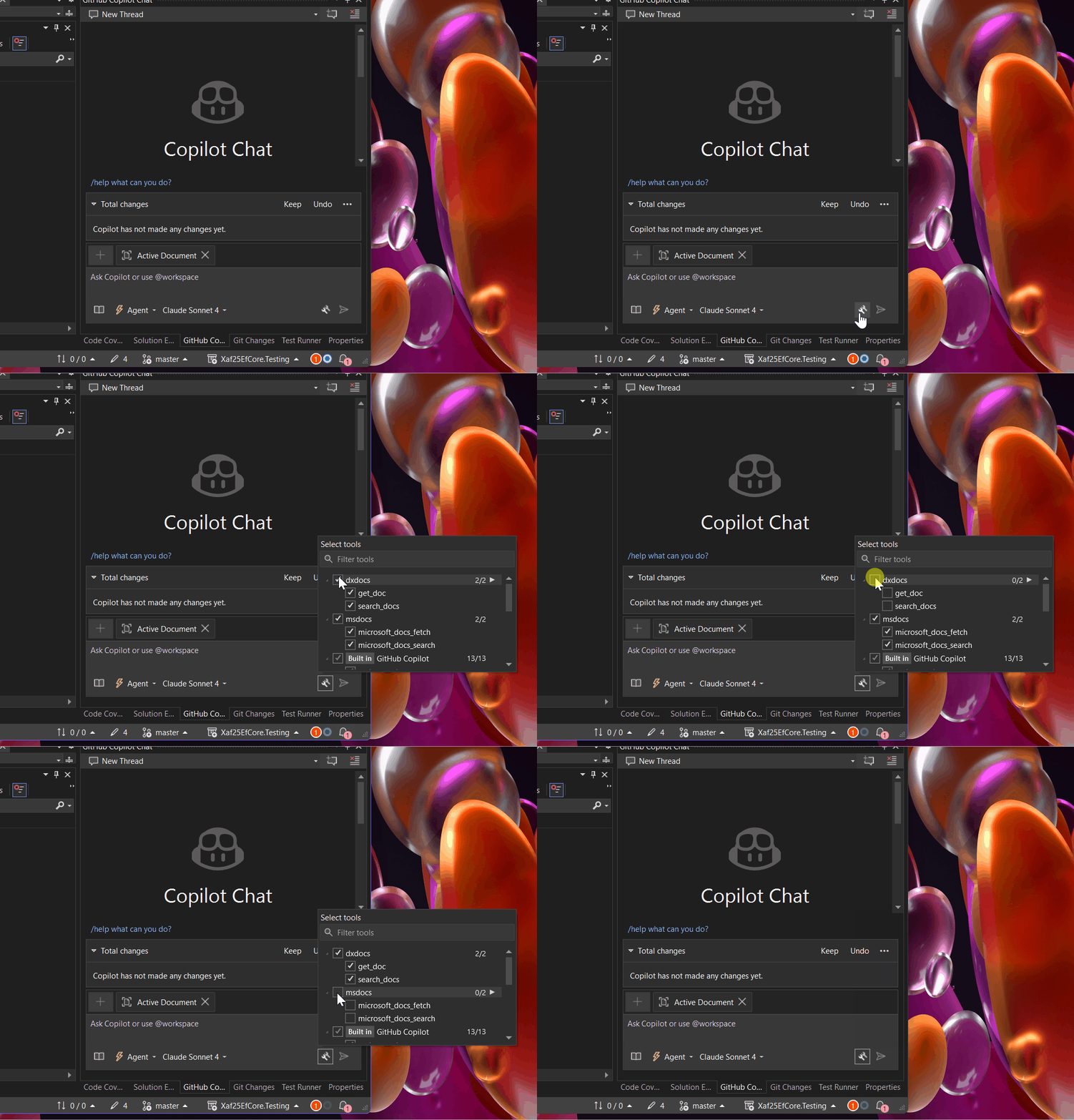
3. Enable MCP in Your Tool
Enable the MCP in your development environment (see the attached screenshot for reference).
How to Use It
Now you can add the phrase “Use dxdocs” to your prompts and voilà! The magic happens.
Example prompt:
“Create a domain object for a customer, add a code name and address property and validate for null using XAF validation rules. Use dxdocs”
Important Disclaimer from DevExpress
The DevExpress MCP Documentation Server is currently available as a preview. Certain DevExpress-related coding tasks may still need further server and prompt fine-tuning. Please share your experience in the comments – both with and without this MCP. Let us know what needs improvement, what additional steps you took to get better results with AI tools in general, and any other feedback you have.
Happy coding with your new AI-powered DevExpress development experience!

by Joche Ojeda | Feb 23, 2025 | A.I
I’ve been thinking about this topic for a while and have collected numerous notes and ideas about how to present abstractions that allow large language models (LLMs) to interact with various systems – whether that’s your database, operating system, word documents, or other applications.
Before diving deeper, let’s review some fundamental concepts:
Key Concepts
First, let’s talk about APIs (Application Programming Interface). In simple terms, an API is a way to expose methods, functions, and procedures from your application, independent of the programming language being used.
Next is the REST API concept, which is a method of exposing your API using HTTP verbs. As IT professionals, we hear these terms – HTTP, REST, API – almost daily, but we might not fully grasp their core concepts. Let me explain how they relate to software automation using AI.
HTTP (Hypertext Transfer Protocol) is fundamentally a way for two applications to communicate using text. This is its beauty – text serves as the basic layer of understanding between systems, meaning almost any system or programming language can produce a client or server that can interact via HTTP.
REST (Representational State Transfer) is a methodology for systems to communicate and either change or read the state of another system.
Levels of System Interaction
When implementing LLMs for system automation, we first need to determine our desired level of interaction. Here are several approaches:
- Human-like Interaction: An LLM can interact with your operating system using mouse and keyboard inputs, effectively mimicking human behavior.
- REST API Integration: Your application can communicate using HTTP verbs and the REST protocol.
- SDK Implementation: You can create a software development kit that describes your application’s functionality and expose this to the LLM.
The connection method will vary depending on your chosen technology. For instance:
- Microsoft Semantic Kernel allows you to create plugins that interact with your system through REST API, database, or SDK.
- Microsoft AI extensions require you to decide on your preferred interaction level before implementation.
- The Model Context Protocol is a newer approach that enables application exposure for LLM agents, with Claude from Anthropic being a notable example.
Implementation Considerations
When automating your system, you need to consider:
- Available Integration Options: Not all systems provide an SDK or API, which can limit automation possibilities.
- Interaction Protocol Choice: You’ll need to decide between REST API, HTTP, or Model Context Protocol.
This overview should help you understand the various levels of resolution needed to automate your application. What’s your preferred method for integrating LLMs with your applications? I’d love to hear your thoughts and experiences.
