Stepping Through Kite Lines in the Debugger
A reader's question, an honest "not yet", and the few lines of code that turned it into "yes".
The question
On my post about compiling a made-up language to .NET, a reader said the "one syntax error becomes fifteen" trap was very real for them: they hit a small version of it with configurable pricing rules, and ended up validating at their own layer first too. Then they asked:
Does the
#linemapping also let you step through Kite lines in the debugger, or is that a separate problem?
The honest answer, the day they asked, was: not yet. And it was a good question, because it sounds like it should come for free.
Why it didn't work
A quick recap of how Kite.NET compiles. The front end turns a .kite file into C# text, with a #line marker before every statement, the way Razor compiles .cshtml pages. Roslyn compiles that C# in memory. The plumbing Kite adds around the program (the class, the namespace) is marked #line hidden.
So when the C# compiler or a .NET analyzer finds a problem, it reports it against the Kite file and line, not the generated C#. That was the whole point of the design, and it worked.
But diagnostics are a compile-time story. A debugger works at run time, and it needs something else: debug symbols. A PDB file is the map from the running machine code back to source files and lines. Kite emitted the assembly into a memory stream and loaded it, and that was all. No PDB, so there was nothing for a debugger to read. The #line markers were there, but nobody was writing them down for the debugger.
The hard part was already done
Here's the part I like. In a PDB, every method has a list of sequence points: "this piece of IL comes from this file, this line, this column". Roslyn builds them from the source it compiles. And when that source carries #line directives, the sequence points follow the directives.
So the map the debugger needs was already being computed. Every statement already said "I am boom.kite, line 5". The plumbing already said "I am hidden". The missing piece was asking Roslyn to emit that map, and handing it to the runtime.
The change
Four small things:
- Emit a portable PDB next to the assembly.
compilation.Emittakes a second stream for the PDB and emit options for the format. - Embed the Kite source in it. The PDB can carry the source text itself, so a debugger can show the Kite file even when it isn't on disk where it was compiled.
- Give the paths a home. The
#linemarkers say"boom.kite", a bare file name. A source resolver turns that into the full path in the PDB, so a debugger can open the real file. The error messages keep the short name. - Load the symbols with the assembly.
AssemblyLoadContext.LoadFromStream(assembly, symbols)takes the PDB too, so the running code knows its own Kite lines.
The heart of it:
using var ms = new MemoryStream();
using var pdb = new MemoryStream();
var emit = compilation.Emit(ms, pdb,
    options: new EmitOptions(debugInformationFormat: DebugInformationFormat.PortablePdb),
    embeddedTexts: [EmbeddedText.FromSource(Path.GetFullPath(path), SourceText.From(source, Encoding.UTF8))]);
// ...
var asm = new AssemblyLoadContext("kite", isCollectible: true).LoadFromStream(ms, pdb);
One trap on the way: Roslyn refused at first with CS8055: Cannot emit debug information for a source text without encoding. The C# text was parsed from a plain string, and debug information needs to know its encoding. Parsing it as SourceText.From(cs, Encoding.UTF8) fixed it.
kite build now writes prog.dll, prog.pdb and, for a program with main, the small prog.runtimeconfig.json that dotnet prog.dll needs to start it. Before, a built Kite program couldn't even be launched on its own, let alone debugged.
How I know it works
I wrote a tiny Kite program that goes wrong on purpose. main calls share, and share divides by zero on line 5:
fn share(total: int, people: int) -> int
    let each = total / people
    return each

fn main()
    let cake = 12
    print("before")
    let slice = share(cake, 0)
    print("after {slice}")
Then I checked it three ways.
The PDB itself. I read it back with System.Reflection.Metadata: it lists boom.kite as a document, carries the embedded Kite source, and has sequence points on Kite lines 5 to 13. Those are the places a debugger can stop.
The runtime's own stack trace. With the symbols loaded, the crash names the Kite file:
at KiteApp.Boom.share(Int32 total, Int32 people) in .../boom.kite:line 5
at KiteApp.Boom.Main() in .../boom.kite:line 11
Line 5 is the division and line 11 is the call, in Kite. Not the generated C#. And kite run now says so in its own error: error: Attempted to divide by zero. (boom.kite:5).
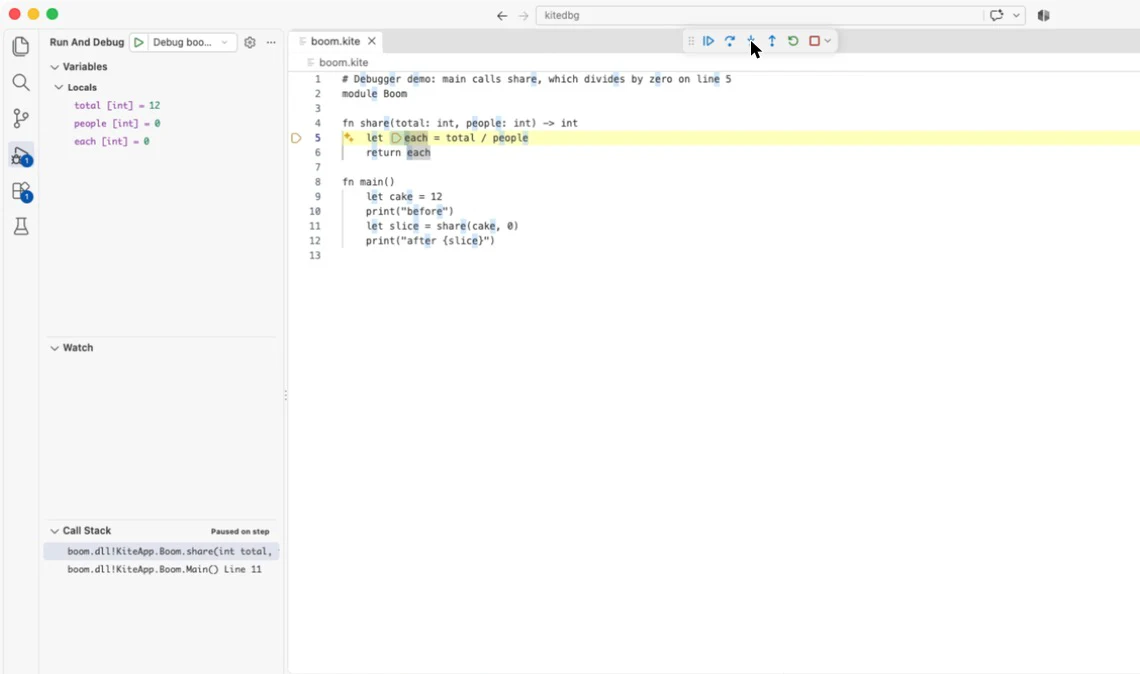
A real debugger. I opened the example in VS Code with the C# extension and pressed Run. It stopped on the first line of main, in boom.kite. Step over went line by line through the Kite code. Step into went into share and stopped on line 5, with the Kite parameters in Locals and the Kite call stack beside them:
total = 12, people = 0, and the stack says share was called from Main() at line 11. The debugger never showed me a line of C#. The #line hidden plumbing kept stepping on Kite lines.
Last, I made sure the check would notice if this broke. The compiler's test script now runs the example and expects (boom.kite:5) in the error. I took the symbols out of LoadFromStream on purpose: the check failed. Put them back: it passed.
What it doesn't do
- Breakpoints on
.kitefiles need one setting. VS Code only lets you click a breakpoint into files of languages it knows."debug.allowBreakpointsEverywhere": truelifts that; the example sets it. - No IntelliSense, no hover types. Those need a language server, which is separate work, as I wrote in part 3.
- The standard library isn't Kite. Kite's built-in functions (
print,map,sum...) are C# compiled alongside the program, and that C# source isn't shipped with it, so step over them rather than into them. - I tested VS Code on a Mac. Visual Studio and Rider read the same portable PDB format, but I haven't tried them yet.
Try it
The example is in the repo, ready to open: compiler/examples/debug. Open the folder in VS Code, press F5, and it stops on the first line of main in boom.kite.
So, to the reader who asked: it was a separate problem, but a small one. The #line markers had already done the hard part. Thanks for the nudge.