Remotion: The Missing Bridge Between React and Video
Remotion: The Missing Bridge Between React and Video
In the last few weeks I have been playing with a lot of local AI video tools. Some of them
are magical, some of them are expensive, and some of them are very good at producing a few
seconds of motion that is hard to control.
That is why Remotion feels so interesting to me.
Remotion is not another text-to-video model. It is not trying to hallucinate a movie from a
prompt. The idea is much more developer-shaped:
What if a video was just a React application with a timeline?
You write components. You pass props. You use CSS, SVG, canvas, audio, images, fonts, data
from APIs, and the same composition patterns you already use on the web. Then Remotion renders
the result into a real video file.
That small shift changes the kind of work that becomes possible.
The mental model
Traditional video tools are timeline-first. You place assets on tracks, drag keyframes, trim
clips, and export a file. That is perfect when the video is a one-off artifact.
Remotion is component-first. A video is a composition, and a composition is a React component
that knows its dimensions, duration, and frame rate.
That means a video can be parameterized:
- one template, many customers
- one layout, many languages
- one animation system, many datasets
- one product demo, many feature flags
- one release-note format, generated every week
This is where Remotion becomes more than "React for video." It becomes a way to build video
systems.
A tiny example
A Remotion composition can be as small as a React component that reads the current frame and
interpolates a value:
import { AbsoluteFill, interpolate, useCurrentFrame } from "remotion";

export function LaunchCard({
  product,
  metric,
}: {
  product: string;
  metric: string;
}) {
  const frame = useCurrentFrame();
  const opacity = interpolate(frame, [0, 20], [0, 1], {
    extrapolateRight: "clamp",
  });
  const y = interpolate(frame, [0, 20], [24, 0], {
    extrapolateRight: "clamp",
  });

  return (
    <AbsoluteFill
      style={{
        background: "#101820",
        color: "white",
        justifyContent: "center",
        alignItems: "center",
        fontFamily: "Inter, sans-serif",
      }}
    >
      <div style={{ opacity, transform: `translateY(${y}px)` }}>
        <h1>{product}</h1>
        <p>{metric}</p>
      </div>
    </AbsoluteFill>
  );
}
That does not look like video editing. It looks like frontend development. And that is the
point.
Once the component exists, you can feed it different props and render different outputs:
<LaunchCard
  product="My SaaS"
  metric="42% faster invoice reconciliation"
/>
Now imagine the props coming from a database, a build pipeline, a CRM, a changelog, a telemetry
query, or an AI agent that has drafted the storyboard. That is when the medium starts to feel
different.
Two different things: the control UI and the reel
The part that clicked for me is that Remotion is not only a renderer. It can sit behind a real
web application.
The user-facing app does not have to expose code. It can expose safe controls: title, subtitle,
brand color, images, voiceover, date range, output format, aspect ratio, and render button. The
React composition stays behind the curtain, and the web UI becomes a little control room for
video generation.
There are really two different screens:
- the control UI: the internal web app where a user configures the video
- the reel output: the vertical 9:16 artifact that gets posted to Shorts, Reels, TikTok, or
a product page
My first examples below are the control UI. They are intentionally more like a SaaS dashboard.
After that, I included reel-style outputs because that is the part people actually watch.
The full runnable
source is in
examples/remotion-web-ui-examples.
Reel-style outputs
This is the format that feels closer to social video: vertical canvas, large text, fast
transitions, captions, and phone-safe layout. Remotion is still just React, but the design
language is completely different from an admin screen.
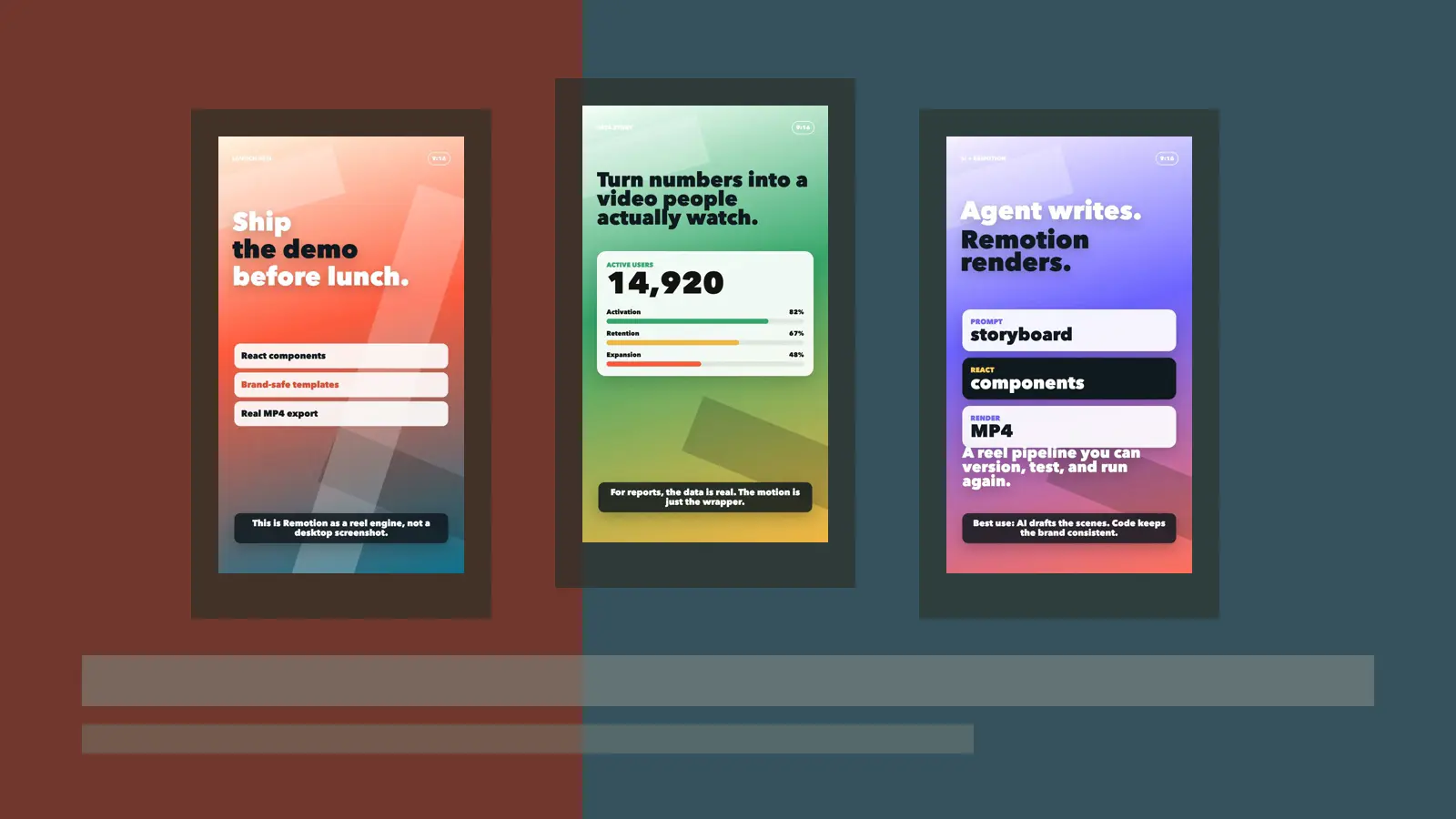
Reel 1: Product launch
The code is still frame-driven React. The reel feeling comes from the 9:16 composition, big
typography, a safe caption area, and a few scene timings:
export function LaunchReel() {
  const frame = useCurrentFrame();
  const p2 = sceneProgress(frame, 60, 125);
  const p3 = sceneProgress(frame, 125, 210);

  return (
    <AbsoluteFill style={{ overflow: "hidden" }}>
      <ReelBackground variant="launch" />
      <PhoneSafeTop label="Launch Reel" />

      <BigWord text="Ship" from={0} top={330} />
      <BigWord text="the demo" from={18} color="#101820" top={450} />
      <BigWord text="before lunch." from={38} top={570} />

      <div style={{ opacity: p2 }}>
        {["React components", "Brand-safe templates", "Real MP4 export"].map((item) => (
          <div className="reel-pill" key={item}>{item}</div>
        ))}
      </div>

      <ReelCaption text="This is Remotion as a reel engine, not a desktop screenshot." />
    </AbsoluteFill>
  );
}
Reel 2: Data story
This one is the useful business case: real metrics, presented like a reel. A dashboard can feed
the numbers; Remotion handles the animation and export.
export function MetricsReel() {
  const frame = useCurrentFrame();
  const countProgress = sceneProgress(frame, 45, 145);
  const users = Math.round(interpolate(countProgress, [0, 1], [0, 18420]));

  return (
    <AbsoluteFill>
      <ReelBackground variant="metrics" />
      <div className="reel-headline">
        Turn numbers into a video people actually watch.
      </div>
      <div className="metric-card">
        <div>Active users</div>
        <strong>{users.toLocaleString()}</strong>
        <MetricBars values={[82, 67, 48]} />
      </div>
      <ReelCaption text="For reports, the data is real. The motion is just the wrapper." />
    </AbsoluteFill>
  );
}
Reel 3: AI workflow
This is the AI-agent angle: let the agent draft the storyboard and the component structure, but
keep the final video deterministic and brandable.
export function WorkflowReel() {
  const frame = useCurrentFrame();
  const steps = [
    ["Prompt", "storyboard"],
    ["React", "components"],
    ["Render", "MP4"],
  ];

  return (
    <AbsoluteFill>
      <ReelBackground variant="workflow" />
      <BigWord text="Agent writes." from={0} top={280} />
      <BigWord text="Remotion renders." from={24} color="#101820" top={408} />

      {steps.map(([label, value], index) => {
        const p = spring({ frame: frame - 54 - index * 24, fps: 30 });
        return <StepCard label={label} value={value} progress={p} />;
      })}
    </AbsoluteFill>
  );
}
And the render commands are just:
npm run render:reel:launch
npm run render:reel:metrics
npm run render:reel:workflow
Those commands produced the three vertical MP4 files embedded above.
Control UI examples
Example 1: Template editor
This is the most common product shape: a form on the left, a preview on the right, and a
timeline scrubber at the bottom. The user edits safe inputs; Remotion renders the preview and
the final MP4 from the same component tree.
The core idea is a normal React component that reads the current frame and maps it to UI
motion:
export function TemplateEditor() {
  const frame = useCurrentFrame();
  const progress = frame / 149;
  const panelIn = spring({ frame, fps: 30, config: { damping: 18 } });
  const knob = interpolate(progress, [0, 1], [22, 356]);

  return (
    <AbsoluteFill style={{ background: "#f7f1e3", padding: 38 }}>
      <aside style={{ transform: `translateX(${interpolate(panelIn, [0, 1], [-50, 0])}px)` }}>
        {/* template controls: headline, colors, aspect ratio, render target */}
      </aside>

      <main>
        <PreviewCard
          title="New inventory module"
          subtitle="A 30 second customer-ready product update"
          progress={progress}
        />

        <div className="timeline">
          <div className="knob" style={{ left: knob }} />
        </div>
      </main>
    </AbsoluteFill>
  );
}
Example 2: Data-driven report preview
This is the dashboard/report use case. The UI chooses a date range or customer account, and the
composition turns real metrics into an animated video. This is where Remotion is much more
useful than a generic video model: the numbers have to be correct.
The trick is just props plus animation:
function Bar({ label, value, index }: { label: string; value: number; index: number }) {
  const frame = useCurrentFrame();
  const amount = spring({
    frame: frame - index * 9,
    fps: 30,
    config: { damping: 22 },
  });

  return (
    <div className="metric-row">
      <strong>{label}</strong>
      <div className="bar">
        <div style={{ width: `${value * amount}%` }} />
      </div>
      <strong>{Math.round(value * amount)}%</strong>
    </div>
  );
}
In a real app, value would come from your database or API. The animation is deterministic:
same data, same video, every time.
Example 3: Batch render queue
This is the SaaS control-plane version. The user does not think about frames or codecs; they
see jobs, formats, status, progress, and finished downloads. Remotion can be sitting behind
that queue locally, on a server, or in Lambda.
The composition is still plain React:
export function RenderQueue() {
  const frame = useCurrentFrame();
  const rows = [
    ["Customer demo", "Rendering", "#d94f35"],
    ["Release notes", "Queued", "#e6a84a"],
    ["Spanish recap", "Done", "#4e8f5c"],
  ];

  return (
    <AbsoluteFill>
      {rows.map(([name, status, color], index) => {
        const progress = Math.max(0, Math.min(1, (frame - index * 12) / 88));

        return (
          <RenderRow
            key={name}
            name={name}
            status={status}
            color={color}
            progress={status === "Done" ? 1 : progress}
          />
        );
      })}
    </AbsoluteFill>
  );
}
And the render commands are boring, which is exactly what I want:
npm run render:template
npm run render:report
npm run render:queue
Those commands produced the three MP4 files embedded above.
What Remotion can do
The official Remotion site describes the core promise as creating real MP4 videos with React,
but the useful part is the workflow around that promise.
1. Build reusable video templates
This is the obvious use case. You create a branded composition once: title screen, transitions,
lower thirds, charts, screenshots, captions, outro. Then you reuse it.
For a software company, that could mean:
- product launch videos
- weekly release notes
- onboarding clips
- customer-specific demos
- changelog summaries
- conference talk bumpers
- social clips for LinkedIn, YouTube Shorts, TikTok, and Instagram
The important part is that the template is code. If your brand color changes, you update a
constant. If your layout rules change, you update a component. If every video needs a new legal
footer, you do not open 40 project files. You change the system.
2. Generate videos from data
This is where Remotion is genuinely strong. A video can be rendered from JSON, an API response,
or a script generated somewhere else.
For example:
- a real estate app can generate a property tour from listing photos and metadata
- an analytics product can turn a dashboard snapshot into a narrated monthly report
- an education platform can generate lesson recaps from course content
- a CRM can generate personalized account-review videos
- a developer tool can turn a GitHub release into a short animated changelog
This is not "AI video" in the usual sense. It is often better: deterministic video assembled
from real data, with AI helping around the edges where it is useful.
3. Preview inside your own app
Remotion includes a Player that lets you preview a
composition in a React application. That matters because it means you can build an editor or
configuration UI around the video.
The user changes a title, picks a theme, swaps a screenshot, adjusts a date range, and sees the
video update before rendering. This is the missing piece for internal tools and SaaS products:
not just "generate a video," but "let a human steer the video generator."
4. Render locally, on servers, or serverlessly
For small work, local rendering is enough. For production workflows, Remotion can render on a
server or use Remotion Lambda for serverless rendering.
That makes the architecture straightforward:
- Design the composition in Remotion Studio.
- Store the inputs as structured data.
- Preview with the Player.
- Render the final MP4 when the user clicks export or when an automation runs.
You can treat rendering as a backend job instead of a manual creative step.
Why this matters now
The timing is good because AI agents are getting good at writing code, and Remotion turns video
into code.
That means an agent can help with:
- drafting the first composition
- translating a storyboard into scenes
- creating variants for different aspect ratios
- wiring captions and timing
- building reusable animation components
- generating test renders
- iterating on a branded template
This is a very different workflow from asking a video model for "a 15-second promo video" and
hoping it understood your product.
With Remotion, the agent is not generating the final pixels directly. It is helping build the
system that generates the pixels. That is a much better fit for software teams because you can
inspect it, version it, test it, reuse it, and fix it.
Remotion versus generated video
I do not see Remotion and AI video models as competitors. They solve different problems.
Use a video model when you need organic motion that would be hard to describe with code: a
person walking, fabric moving, water, handheld footage, camera motion through a realistic
scene.
Use Remotion when you need control:
- text must be readable
- timing must be exact
- brand rules matter
- data must be accurate
- layouts must be reusable
- the same video must be generated many times
- the result must be explainable and editable
In practice, the best workflow may combine both. Generate a background clip or a stylized
image with an AI model, then use Remotion to assemble the actual video: titles, captions,
music, timing, transitions, screenshots, charts, and export.
That division feels right. Let generative models create assets. Let Remotion be the production
system.
The boring power: repeatability
The most underrated feature of code is that it remembers.
A manual video project remembers what you did only as a pile of layers and keyframes. A
Remotion project remembers it as functions, props, constants, and components. That makes it
much easier to answer questions like:
- What changed between version 1 and version 2?
- Can we render this in Spanish?
- Can we make it vertical?
- Can we swap the customer logo?
- Can we generate 200 of these overnight?
- Can we use the same animation style in the next campaign?
That is boring in the best possible way. Boring is how workflows become reliable.
Where I would use it
For my own projects, I can see Remotion fitting into several places:
- AI-assisted product demos: agent drafts the script, Remotion renders the branded scenes.
- Local AI Studio reels: still images, generated music, captions, and transitions assembled
as code. - Documentation videos: turn markdown sections into short narrated explainers.
- Release notes: generate a 30-second summary from a changelog.
- Conference material: title cards, timers, speaker intros, and loopable background motion.
- Data storytelling: charts and metrics that animate from real values.
The common thread is not "make one video." The common thread is "make a video workflow I can
run again."
Getting started
The quickest path is the official starter:
npx create-video@latest
Then open the project, start the dev server, and work in Remotion Studio. The learning curve is
mostly learning how Remotion maps time to frames. If you already know React, the rest feels
surprisingly familiar.
The concepts I would learn first are:
useCurrentFrame()for frame-based animationinterpolate()for mapping frames to values- compositions for defining duration, fps, width, and height
- props for parameterized videos
- the Player for embedding previews in an app
- server-side or Lambda rendering when exports need to scale
You do not need to master everything before producing something useful. A title card, a few
images, a soundtrack, and captions are enough to make a real video.
Takeaway
Remotion is interesting because it does not ask developers to stop being developers.
It says: keep React, keep components, keep data, keep version control, keep your automation
mindset. Now aim that at video.
For one-off cinematic shots, I will still reach for video models or traditional editing tools.
But for product videos, explainers, dashboards, release notes, personalized clips, and anything
that needs to be generated more than once, Remotion is a very practical bridge.
It turns video from an artifact into a system.
And once video becomes a system, it becomes something software people can build, automate, and
improve.